Agent guide
A sourcing or buying agency runs Pasera for the brands it works for. The agency has its own home, and inside each client brand it sees exactly what the brand would see.
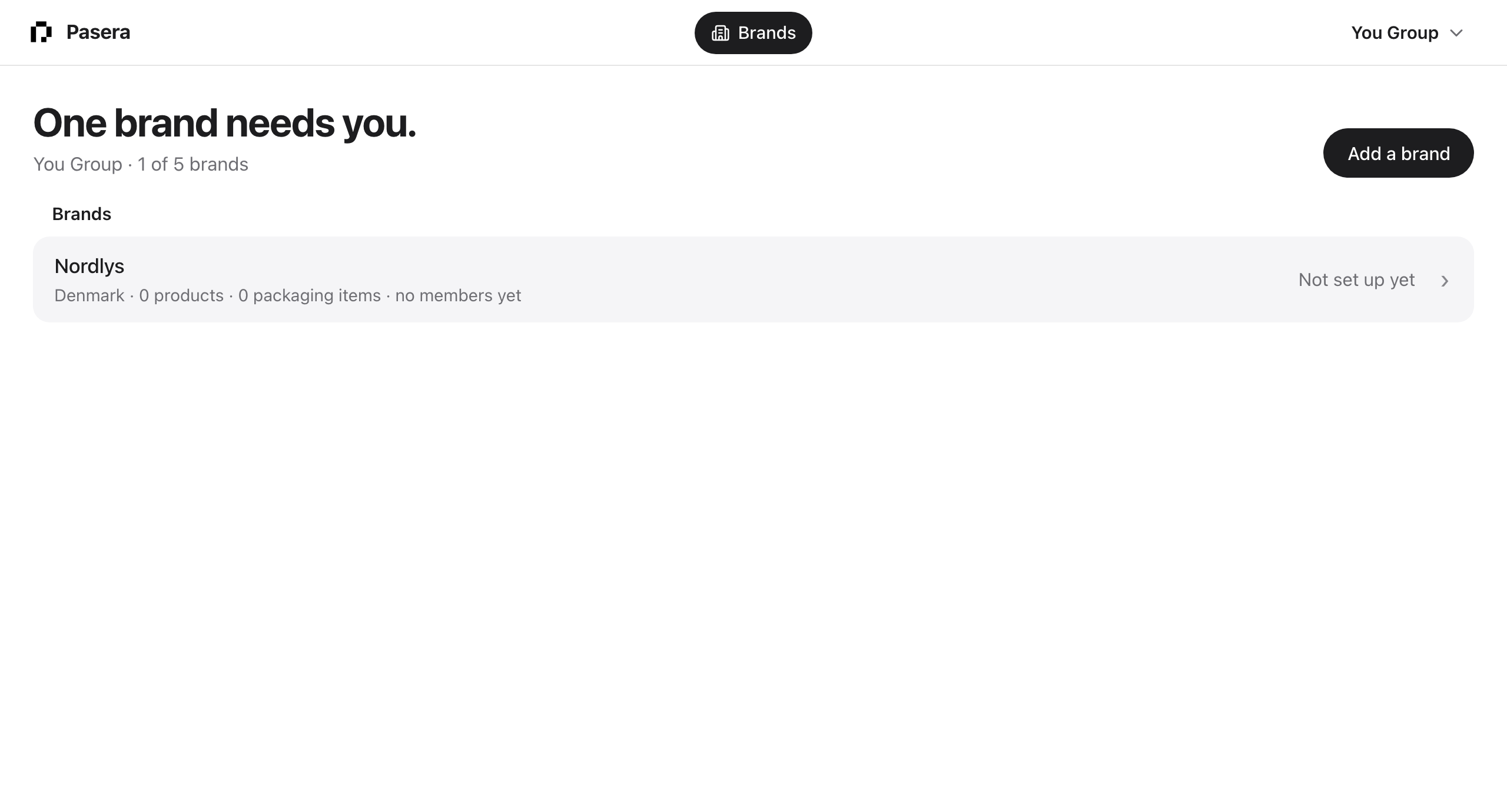
Your home
Signed in, you land on your brands. The headline says whether any of them needs you; each row shows the brand’s country, its counts, and that brand’s own Overview headline as its state. Click a row to work inside the brand. Add a brand creates a new client with its legal name, country and, optionally, the owner’s email for an invitation.
Inside a brand
You see the brand’s Overview, products, packaging items, suppliers, batches, documents and settings, and you work as the brand: the declarations name the brand as the economic operator, and the supplier links go out in the brand’s name. The account menu lists your other brands at the top for a one-click switch, “Brands” returns to your home, and “Your agency” opens your own company record.
Your agency
Under the account menu on your home: Agency holds your own company record, which never appears on a client’s declaration; Team is your own people; Your account is you.
Limits
Your plan sets how many brands you can work for. The home reads “3 of 5 brands” and Add a brand explains when the limit is reached. Ask Pasera to raise it.
Classic tools
Production requests, proposals and the supplier network from the earlier agency portal are still available under /classic/ while they move into the new interface. The pages in this guide’s other sections describe them.